Properties
- Use it to create and publish the property listings on your website, for sale or for rent.
- In the side menu it is under Properties > Properties.
- The most common task: press + Property, enter title, type and price, then complete the record and publish it.
What it is
A vertical module for creating, saving and publishing real estate listings.
Each published property becomes a public page of the site with an address like /immobili/listing-name, so the module is part of the Digital growth category.
The module covers the full listing lifecycle:
- showcase data (title, price, type, rooms, surfaces, state);
- public content (description, gallery, features, energy);
- private area (internal notes, exact location, cadastral data, floor plans, private gallery);
- publishing on the site;
- matching with registered users' preferences.
When it is visible
It is visible for Real Estate businesses or configurations that manage property listings.
The Properties entry appears when the module is active for your studio and you have permission to manage properties. The module is switched on by request: if the entry doesn't appear, write to support.
Main sectors
- Real Estate
Dependencies
Can be linked to:
- Users
- Contacts — property preferences can be associated with a contact
- Preferences
- Matching
- Digital growth
- Gallery
- Multilingual
- Communication
Property list
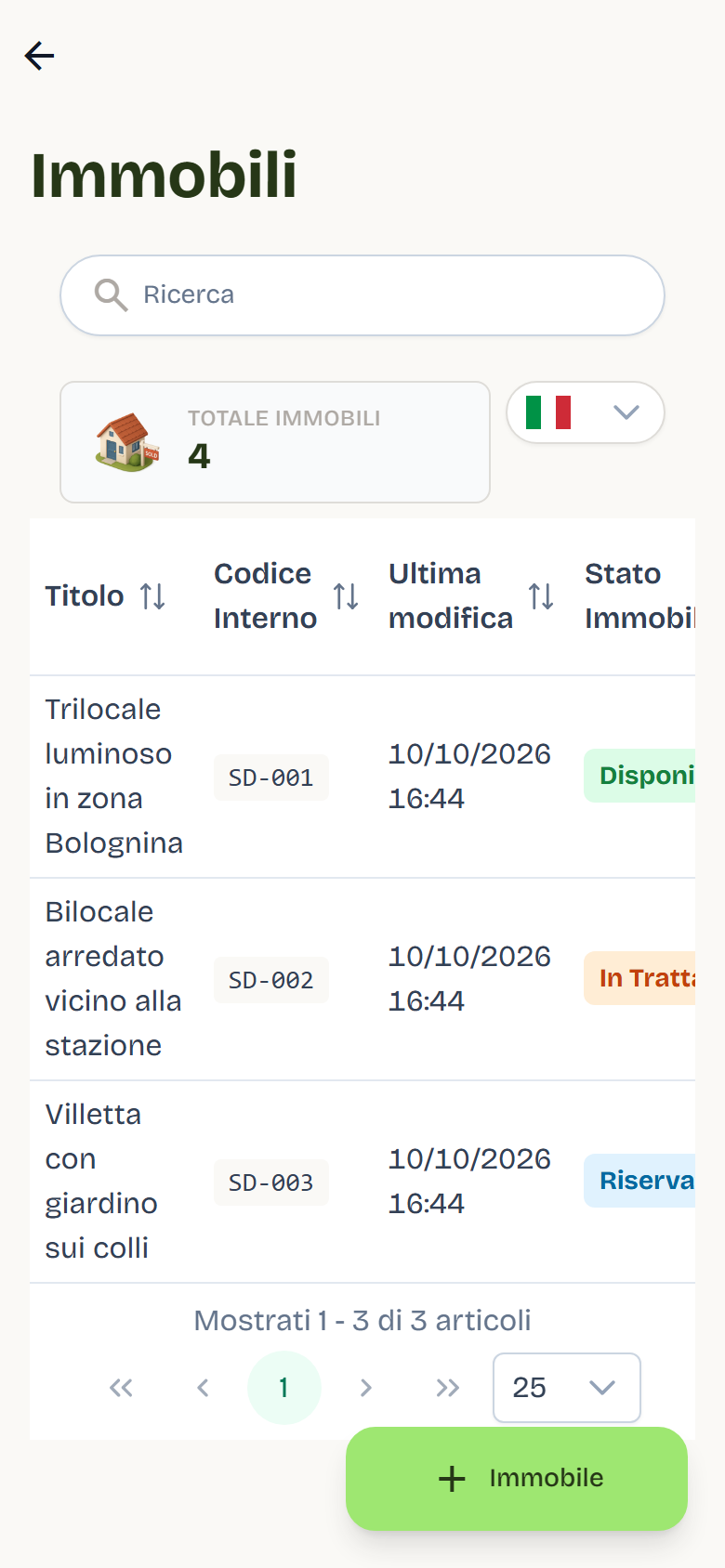
Opening Properties > Properties in the side menu shows the listing of ads with the total at the top.
| Column | What it shows |
|---|---|
| Title | Listing title. If the media scan flagged problems, a warning icon appears with the reason. |
| Internal code | Automatically generated reference code. |
| Last modified | Date and time of the last update. |
| Property status | Colored badge with the commercial state (see below). |
| Visibility on Portals | Visible or Hidden. |
| Status | Publication status: Draft or Published. |
| Actions | Manage and Delete. |
List functions:
- text search on title, code, date and state;
- filter by Property status and Visibility on Portals;
- column sorting, remembered between sessions;
- All / Needs attention (n) filter when the media scan flagged incompatible media;
- sold, rented or withdrawn properties do not appear in the list.
Creating a new property
- Open Properties.
- Select + Property.
- Fill in the dialog:
- Property title (required);
- Listing type — Sale (default) or Rent;
- Price — for sale the selector includes the Price on request option (the price is not shown publicly); for rentals enter the Rent amount per month;
- City — autocomplete field, optional, geolocated.
- Confirm with Create.
Flo creates a draft and immediately opens the detail card. The draft starts with property type Apartment, city to complete and no portal visibility: it is normal for an incomplete draft not to be publishable.
The gallery and floor plans unlock only after the first save.
Property states and field locking
The state tells how far along the listing is:
| State | Meaning |
|---|---|
| Available | Listing open to offers. |
| In Negotiation | Negotiation in progress. |
| Reserved | Reserved for a buyer. |
| Under Option | Option agreement in place. |
| Compromised | Preliminary contract signed. |
| Deed Pending | Awaiting the final deed. |
| Sold | Sale completed. |
| Rented | Rental completed. |
| Withdrawn | Listing withdrawn from the market. |
When the property reaches a final state — Sold, Rented, Withdrawn, Deed Pending or Compromised — the whole card is locked except Status: fields, galleries, title and Exclusive. This prevents accidental changes to completed listings. A notice at the top of the card names the status, and the Change status button takes you to the Status field: pick a non-final status (for example Available) and the fields unlock right away. The lock also applies on the server: a save that changes a locked field is refused with the field's name.
Publishing
The detail card has two levels:
- Draft: visible only in the back office.
- Published: online on the site.
To publish:
- Complete the required data: title, slug, listing type, property type, city, price (for sale) or rent (for rental).
- Use Publish from the detail view.
- Flo checks the rules field by field before saving: if something is missing or invalid, it saves nothing, marks each field to fix in red with the reason written below it (price, rent, city, province, postcode) and the publishing panel lists the fields by name.
On save Flo generates the slug from the title if it is missing or still the placeholder; publication makes it final.
To remove the listing from the site, use Unpublish: the card returns to draft and portal visibility is reset.
Notes:
- The slug can only be edited before publishing (pencil icon next to the field). After publishing it is locked and title changes do not update it: already-published links stay valid.
- The list always shows Draft or Published and portal visibility.
Property detail
Opening a listing with Manage shows a three-section editor:
| Section | Content |
|---|---|
| Ad | Public listing data. |
| Explore | Private area: content for the team and authorized users. |
| Matching | Matching with user preferences. |
Editor behaviors:
- Unsaved-changes protection: leaving the page, the browser asks for confirmation.
- Edit indicator: modified fields have a yellow border on the left.
- Slug locked after publishing.
- Multilingual: in languages other than Italian only texts can be edited; numeric fields, dates and selections are locked (padlock icon). Location and images are shared across languages, but image titles and descriptions can be translated. Before creating a new language, publish the Italian version.
- Suggerisci traduzioni: from the translation-mode banner you can generate a proposed translation of the texts and apply it after review (requires a configured translation service).
Ad section
Panels open as an accordion (one at a time).
Showcase
The listing's main data:
- Listing type (Sale / Rent), Property type (Apartment, Studio, Two-room apartment, Villa, Detached house, Country house, Office, Land, Garage, Penthouse);
- Price or Rent amount depending on the listing type;
- City, Province and Postal code (filled in by the city selector; province and postal code are read-only);
- Rooms, Bathrooms, Living area, Commercial living area;
- Status and Featured;
- Exclusive: enabling and disabling require confirmation; when active a notice appears and, as indicated by the interface, private-area content becomes public;
- Slug and Internal code;
- last-modified date and publication date.
Automatic check: the commercial living area cannot be less than the living area. It can be equal or greater.
Storytelling
Editor for the public Description text. The AI testuale in arrivo tag indicates that assisted generation is not yet active. Editing only the Description is enough to save the draft.
Gallery
Unified public gallery:
- maximum 3 media: the first is the cover, the other two complete the gallery;
- supported formats: JPG, PNG, GIF, WebP, MP4 (max 100 MB per file);
- single or multiple upload, reordering, title and description per item (translatable);
- available after the first save.
Surfaces
Cards for the property's surfaces, each with a switch:
- Living area, Garden, Terrace, Balcony, Garage, Cellar, Attic;
- per type: surface (m²), floor (where applicable) and commercial surface;
- external fields: Box Auto, Orientation, View.
Unfilled fields are not shown. Surface area cannot be less than the commercial surface.
Land details
Visible only for listings with land fields:
- Land type (Buildable, Agricultural, Vineyard, Olive grove, Woodland);
- Land area and Buildable area (buildable area cannot exceed the total);
- Zoning;
- Driveway access, Water connection, Electricity connection.
Gruppi tecnici
- Comfort and characteristics: bedrooms, kitchen, floor, building floors, year built, property condition, furnishing, brightness.
- Energy efficiency: energy class, IPE index, heating, air conditioning, annual heating costs. Includes the Photovoltaic system section with a switch: disabling it clears the related fields; incentives are managed by a separate switch.
- Expenses and rental: condominium fees, deposit, rental contract, availability date.
- Amenities and accessories: elevator, built-in wardrobe, fireplace, double exposure, fiber optic, jacuzzi, alarm system, security door, electric gate, video intercom, window frames, TV system.
Explore section (private area)
The private area holds data that must not appear in the public part of the listing. The indigo banner identifies it. Panels:
- Internal description — internal team notes.
- Exact location — full address with interactive map: street, city, postal code, province and GPS coordinates set on the map.
- Cadastral data — cadastral category, land registry sheet (foglio), parcel (particella), sub-unit (subalterno), urban-planning compliance, cadastral compliance, and certifications.
- Floor plans — up to 10 floor plans with title and description; upload and deletion only in the Italian version.
- Private gallery — internal photos with no number limit, with title and description per image; upload and deletion only in the Italian version.
On the site, private-area content is visible to users who have logged in and accepted the terms (see below).
Matching section
The tab shows how close the property is to registered users' preferences. Flo calculates the scores and updates them each time you open the tab.
Summary cards (clickable to filter, a second click resets):
| Card | Criterion |
|---|---|
| Hot Matches | Score ≥ 70%, excluding archived. |
| To Contact | Match state New. |
| In Negotiation | States Contacted, Visit or Negotiation. |
User list — each row shows:
- avatar, name (link to the user or contact card) and preference profile name;
- score as a percentage, with color: green ≥ 70, yellow 40–69, red < 40;
- requirements summary (e.g. "Sale / Apartment · Milan · 2+ rooms · max €250,000");
- matching points (green) and missing points (red).
The row's state selector tracks contact:
| State | Meaning |
|---|---|
| New | Never contacted. |
| Contacted | First contact made. |
| Visit | Visit scheduled or carried out. |
| Negotiation | Negotiation in progress. |
| Archived | No longer interested. |
The Archived button shows discarded entries at the bottom, dimmed.
Preferences and matching
Preferences are managed from the contact card:
- Contacts → contact detail → Property preferences section.
Each profile has a name (e.g. "First home in Milan"), an Active profile switch, notes and criteria groups. You can start from a template (Young first-time buyer, Investment, Student rental, Family) and then edit it.
For each group choose a priority level:
| Priority | Effect |
|---|---|
| Indifferent | Group excluded from the calculation. |
| Nice to have | Weight 1. |
| Important | Weight 3. |
| Required | If the group is not 100% satisfied, the user is excluded. If satisfied, it weighs 5. |
The final score is the weighted average of active groups (0–100%). A group without criteria scores 100%.
Groups compared:
| Group | Criteria |
|---|---|
| Budget | Listing type, price range, rent range. |
| Property type | Property type, rental contract, property state. |
| Location | City, province or postal code: a single match scores 100%. |
| Size | Surface, minimum rooms, bedrooms, minimum bathrooms, floor. |
| Features | Boolean features (elevator, garden, garage box, etc.), split between required and desired. |
| Energy | Minimum energy class, heating, air conditioning. |
| Finishes | Furnishing, garage box, orientation, view, brightness. |
The score is decision support: always read it together with real knowledge of the client and the property.
Private-area access and personal data
On the site, private-area data is shown only after login and only for published listings: a draft answers as a listing not found and adds no history rows.
- the authenticated user accepts the terms and can subscribe to the newsletter;
- at first access Flo records the acceptance;
- on subsequent visits Flo records each visit.
The history is available in the user card, Access history section (shown when the Properties module is active), with internal code, property title, access type, location, masked IP and date. Closely repeated accesses do not generate duplicate rows.
The user's property data (accesses, preferences, and reserved-area access links) is included in the user's GDPR export.
Deleting a property
The delete dialog offers two modes:
| Mode | Effect |
|---|---|
| Local only | Removes the property from Flo. A listing already published on the website is left as it is. |
| Local + Strapi | Removes the property from Flo and from the website too, in the languages you choose. |
The Local + Strapi option appears only if the property is already published on the website; otherwise only Local only is available. Strapi is the name of the system that publishes listings on the website, which is why it appears in the label.
Best practices
- Before publishing, re-read the card as a client would: title, price, description and images must tell the same story.
- Use a clear cover photo: it is the first image shown in lists and previews.
- Order the gallery like an ideal property visit and avoid duplicates.
- Check that public and private photos are in the correct section.
- Keep the state up to date: it is the signal the team uses to understand where the negotiation stands.
- Update the preferences of interested users: matching is only useful if criteria are current.
- Before placing sensitive documents or images in the private area, verify it is the correct section.